Testing Blog
Covering all your codebases: A conversation with a Software Engineer in Test
Saturday, August 11, 2012
Cross-posted from the
Google Student Blog
Today we’re featuring Sabrina Williams, a Software Engineer in Test who joined Google in August 2011. Software Engineers in Test undertake a broad range of challenges on a daily basis, designing and building intelligent systems that can explore various use cases and scenarios for distributed computing infrastructure. Read on to learn more about Sabrina’s path to Google and what she works on now that she’s here!
Tell us about yourself and how you got to Google.
I grew up in rural Prunedale, Calif. and went to Stanford where I double-majored in philosophy and computer science. After college I spent six years as a software engineer at HP, working primarily on printer drivers. I began focusing on testing my last two years there—reading books, looking up information and prototyping test tools in my own time. By the time I left, I’d started a project for an automated test framework that most of our lab used.
I applied for a software engineering role at Google four years ago and didn’t do well in my interviews. Thankfully, a Google recruiter called last year and set me up for software engineer (SWE) interviews again. After a day of talking about testing and mocking for every design question I answered, I was told that there were opportunities for me in SWE and SET. I ended up choosing the SET role after speaking with the SET hiring manager. He said two things that convinced me. First, SETs spend as much time coding as SWEs, and I wanted a role where I could write code. Second, the SETs job is to creatively solve testing problems, which sounded more interesting to me than writing features for a product. This seemed like a really unique and appealing opportunity, so I took it!
So what exactly do SETs do?
SETs are SWEs who are really into testing. We help SWEs design and refactor their code so that it is more testable. We work with test engineers (TEs) to figure out how to automate difficult test cases. We also write harnesses, frameworks and tools to make test automation possible. SETs tend to have the best understanding of how everything plays together (production code, manual tests, automated tests, tools, etc.) and we have to make that information accessible to everyone on the team.
What project do you work on?
I work on the
Google Cloud Print
team. Our goal is to make it possible to print anywhere from any device. You can use Google Cloud Print to connect home and work printers to the web so that you (and anyone you share your printers with) can access them from your phone, tablet, Chromebook, PC or any other supported web-connected device.
What advice would you give to aspiring SETs?
First, for computer science majors in general: if there’s any other field about which you are passionate, at least minor in it. CS is wonderfully chameleonic in that it can be applied to anything. So if, for example, you love art history, minor in art and you can write software to help restore images of old paintings.
For aspiring SETs, challenge yourself to write tests for all of the code you write for school. If you can get an internship where you have access to a real-world code base, study how that company approaches testing their code. If it’s well-tested, see how they did it. If it’s not well-tested, think about how you would test it. I don’t (personally) know of a CS program that has even a full course based on testing, so you’ll have to teach yourself. Start by looking up buzzwords like “unit test” and “test-driven development.” Look up the different types of tests (unit, integration, component, system, etc.). Find a code coverage tool (if a free/cheap one is available for your language of choice) and see how well you’re covering your code with your tests. Write a tool that will run all of your tests every time you build your code. If all of this sounds like fun...well...we need more people like you!
If you’re interested in applying for a Software Engineer in Test position, please apply for our general
Software Engineer
position, then indicate in your resume objective line that you’re interested in the SET role.
Posted by Jessica Safir, University Programs
2 comments
Welcome to the Next Generation of Google Testing
Saturday, August 04, 2012
By
Anthony Vallone
Wow... it has been a long time since we’ve posted to the blog. This past year has been a whirlwind of change for many test teams as Google has restructured leadership with a focus on products. Now that the dust has settled, our teams are leaner, more focused, and more effective. We have learned quite a bit over the past year about how best to tackle and manage test problems at monumental scale. The next generation of test teams at Google are looking forward to sharing all that we have learned. Stay tuned for a revived Google Testing Blog that will provide deep insight into our latest testing technologies and strategies.
12 comments
RPF: Google's Record Playback Framework
Thursday, November 17, 2011
By Jason Arbon
At
GTAC
, folks asked how well the Record/Playback (RPF) works in the Browser Integrated Test Environment (
BITE
). We were originally skeptical ourselves, but figured somebody should try. Here is some anecdotal data and some background on how we started measuring the quality of RPF.
The idea is to just let users use the application in the browser, record their actions, and save them as a javascript to play back as a regression test or repro later. Like most test tools, especially code generating ones, it works most of the time but its not perfect. Po Hu had an early version working, and decided to test this out on a real world product. Po, the developer of RPF, worked with the chrome web store team to see how an early version would work for them. Why
chrome web store
? It is a website with lots of data-driven UX, authentication, file upload, and it was changing all the time and breaking existing
Selenium
scripts: a pretty hard web testing problem, only targeted the chrome browser, and most importantly they were sitting 20 feet from us.
Before sharing with the chrome web store test developer Wensi Liu, we invested a bit of time in doing something we thought was clever: fuzzy matching and inline updating of the test scripts. Selenium rocks, but after an initial regression suite is created, many teams end up spending a lot of time simply maintaining their Selenium tests as the products constantly change. Rather than simply fail like the existing Selenium automation would do when a certain element isn’t found, and require some manual DOM inspection, updating the Java code and re-deploying, re-running, re-reviewing the test code what if the test script just kept running and updates to the code could be as simple as point and click? We would keep track of all the attributes in the element recorded, and when executing we would calculate the percent match between the recorded attributes and values and those found while running. If the match isn’t exact, but within tolerances (say only its parent node or class attribute had changed), we would log a warning and keep executing the test case. If the next test steps appeared to be working as well, the tests would keep executing during test passes only log warnings, or if in debug mode, they would pause and allow for a quick update of the matching rule with point and click via the BITE UI. We figured this might reduce the number of false-positive test failures and make updating them much quicker.
We were wrong, but in a good way!
We talked to the tester after a few days of leaving him alone with RPF. He’d already re-created most of his Selenium suite of tests in RPF, and the tests were already breaking because of product changes (its a tough life for a tester at google to keep up with the developers rate of change). He seemed happy, so we asked him how this new fuzzy matching fanciness was working, or not. Wensi was like “oh yeah, that? Don’t know. Didn’t really use it...”. We started to think how our update UX could have been confusing or not discoverable, or broken. Instead, Wensi said that when a test broke, it was just far easier to re-record the script. He had to re-test the product anyway, so why not turn recording on when he manually verified things were still working, remove the old test and save this newly recorded script for replay later?
During that first week of trying out RPF, Wensi found:
77% of the features in Webstore were testable by RPF
Generating regression test scripts via this early version of RPF was about 8X faster than building them via Selenium/WebDriver
The RPF scripts caught 6 functional regressions and many more intermittent server failures.
Common setup routines like login should be saved as modules for reuse (a crude version of this was working soon after)
RPF worked on Chrome OS, where Selenium by definition could never run as it required client-side binaries. RPF worked because it was a pure cloud solution, running entirely within the browser, communicating with a backend on the web.
Bugs filed via bite, provided a simple link, which would install BITE on the developers machine and re-execute the repros on their side. No need for manually crafted repro steps. This was cool.
Wensi wished RPF was cross browser. It only worked in Chrome, but people did occasionally visit the site with a non-Chrome browser.
So, we knew we were onto something interesting and continued development. In the near term though, chrome web store testing went back to using Selenium because that final 23% of features required some local Java code to handle file upload and secure checkout scenarios. In hindsight, a little testability work on the server could have solved this with some AJAX calls from the client.
We performed a check of how RPF faired on some of the top sites of the web. This is shared on the
BITE project wiki
. This is now a little bit out of date, with lots more fixes, but it gives you a feel for what doesn’t work. Consider it Alpha quality at this point. It works for most scenarios, but there are still some serious corner cases.
Joe Muharsky drove a lot of the UX (user experience) design for BITE to turn our original and clunky developer and functional-centric UX into something intuitive. Joe’s key focus was to keep the UX out of the way until it is needed, and make things as self-discoverable and findable as possible. We’ve haven't done formal usability studies yet, but have done several experiments with external crowd testers using these tools, with minimal instructions, as well as internal dogfooders filing bugs against Google Maps with little confusion. Some of the fancier parts of RPF have some hidden easter eggs of awkwardness, but the basic record and playback scenarios seem to be obvious to folks.
RPF has graduated from the experimental centralized test team to be a formal part of the Chrome team, and used regularly for regression test passes. The team also has an eye on enabling non-coding crowd sourced testers generate regression scripts via BITE/RPF.
Please join us in maintaining
BITE/RPF
, and be nice to Po Hu and Joel Hynoski who are driving this work forward within Google.
9 comments
GTAC Videos Now Available
Tuesday, November 15, 2011
By James Whittaker
All the GTAC 2011 talks are now available at
http://www.gtac.biz/talks
and also up on You Tube. A hearty thanks to all the speakers who helped make this the best GTAC ever.
Enjoy!
No comments
ScriptCover makes Javascript coverage analysis easy
Tuesday, October 25, 2011
By Ekaterina Kamenskaya, Software Engineer in Test, YouTube
Today we introduce the Javascript coverage analysis tool
,
ScriptCover
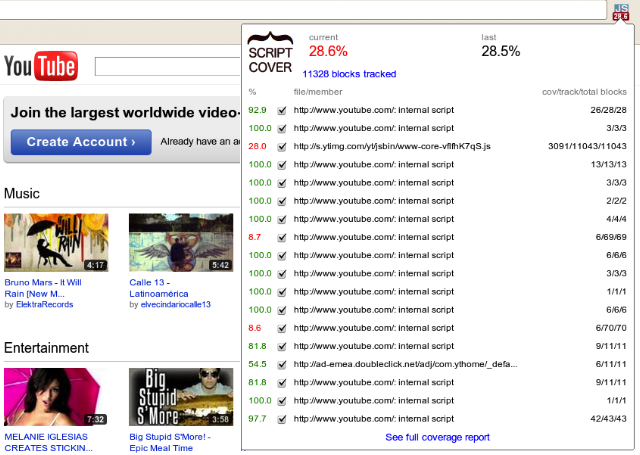
. It is a Chrome extension that provides line-by-line Javascript code coverage statistics for web pages in real time without any user modifications required. The results are collected both when the page loads and as users interact with it.
The tool reports details about total web page coverage and for each external/internal script, as well as annotated code sources with individually highlighted executed lines.
Short report in Chrome extension’s popup, detailing both overall scores and per-script coverage.
Main features:
Report current and previous total Javascript coverage percentages and total number of instrumented code instructions.
Report Javascript coverage per individual instruction for each internal and external script.
Display detailed reports with annotated Javascript source code.
Recalculate coverage statistics while loading the page and on user actions.
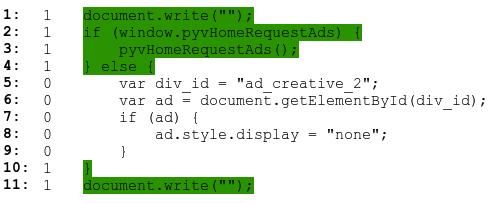
Sample of annotated source code from detailed report. First two columns are line number and number of times each instruction has been executed.
Here are the benefits of
ScriptCover
over other existing tools:
Per instructions coverage for external and internal scripts:
The tool formats original external and internal Javascript code from ‘<script>’ tags to ideally place one instruction per line and then calculates and displays Javascript coverage statistics.
It is useful even when the code is compressed to one line.
Dynamic:
Users can get updated Javascript coverage statistics while the web page is loading and while interacting with the page.
Easy to use:
Users with different levels of expertise can install and use the tool to analyse coverage. Additionally, there is no need to write tests, modify the web application’s code, save the inspected web page locally, manually change proxy settings, etc.
When the extension is activated in a Chrome browser, users just navigate through web pages and get coverage statistics on the fly.
It’s free and open source!
Want to try it out?
Install
ScriptCover
and let us know what you think
.
We envision many potential features and improvements for
ScriptCover.
If you are passionate about code coverage, read our
documentation
and
participate in
discussion group
.
Your contributions to the project’s
design
,
code base
and
feature requests
are welcome!
4 comments
Labels
TotT
113
GTAC
61
James Whittaker
42
Misko Hevery
32
Code Health
31
Anthony Vallone
27
Patrick Copeland
23
Jobs
18
Andrew Trenk
13
C++
11
Patrik Höglund
8
JavaScript
7
Allen Hutchison
6
George Pirocanac
6
Zhanyong Wan
6
Harry Robinson
5
Java
5
Julian Harty
5
Adam Bender
4
Alberto Savoia
4
Ben Yu
4
Erik Kuefler
4
Philip Zembrod
4
Shyam Seshadri
4
Chrome
3
Dillon Bly
3
John Thomas
3
Lesley Katzen
3
Marc Kaplan
3
Markus Clermont
3
Max Kanat-Alexander
3
Sonal Shah
3
APIs
2
Abhishek Arya
2
Alan Myrvold
2
Alek Icev
2
Android
2
April Fools
2
Chaitali Narla
2
Chris Lewis
2
Chrome OS
2
Diego Salas
2
Dori Reuveni
2
Jason Arbon
2
Jochen Wuttke
2
Kostya Serebryany
2
Marc Eaddy
2
Marko Ivanković
2
Mobile
2
Oliver Chang
2
Simon Stewart
2
Stefan Kennedy
2
Test Flakiness
2
Titus Winters
2
Tony Voellm
2
WebRTC
2
Yiming Sun
2
Yvette Nameth
2
Zuri Kemp
2
Aaron Jacobs
1
Adam Porter
1
Adam Raider
1
Adel Saoud
1
Alan Faulkner
1
Alex Eagle
1
Amy Fu
1
Anantha Keesara
1
Antoine Picard
1
App Engine
1
Arham Jain
1
Ari Shamash
1
Arif Sukoco
1
Bartosz Papis
1
Benjamin Pick
1
Bob Nystrom
1
Bruce Leban
1
Carlos Arguelles
1
Carlos Israel Ortiz García
1
Cathal Weakliam
1
Christopher Semturs
1
Clay Murphy
1
Dagang Wei
1
Dan Maksimovich
1
Dan Shi
1
Dan Willemsen
1
Dave Chen
1
Dave Gladfelter
1
David Bendory
1
David Mandelberg
1
Derek Snyder
1
Diego Cavalcanti
1
Dmitry Vyukov
1
Eduardo Bravo Ortiz
1
Ekaterina Kamenskaya
1
Elliott Karpilovsky
1
Elliotte Rusty Harold
1
Espresso
1
Felipe Sodré
1
Francois Aube
1
Gene Volovich
1
Google+
1
Goran Petrovic
1
Goranka Bjedov
1
Hank Duan
1
Havard Rast Blok
1
Hongfei Ding
1
Jason Elbaum
1
Jason Huggins
1
Jay Han
1
Jeff Hoy
1
Jeff Listfield
1
Jessica Tomechak
1
Jim Reardon
1
Joe Allan Muharsky
1
Joel Hynoski
1
John Micco
1
John Penix
1
Jonathan Rockway
1
Jonathan Velasquez
1
Josh Armour
1
Julie Ralph
1
Kai Kent
1
Kanu Tewary
1
Karin Lundberg
1
Kaue Silveira
1
Kevin Bourrillion
1
Kevin Graney
1
Kirkland
1
Kurt Alfred Kluever
1
Kyle Freeman
1
Manjusha Parvathaneni
1
Marek Kiszkis
1
Marius Latinis
1
Mark Ivey
1
Mark Manley
1
Mark Striebeck
1
Matt Lowrie
1
Meredith Whittaker
1
Michael Bachman
1
Michael Klepikov
1
Mike Aizatsky
1
Mike Wacker
1
Mona El Mahdy
1
Noel Yap
1
Palak Bansal
1
Patricia Legaspi
1
Per Jacobsson
1
Peter Arrenbrecht
1
Peter Spragins
1
Phil Norman
1
Phil Rollet
1
Pooja Gupta
1
Project Showcase
1
Radion Khait
1
Radoslav Vasilev
1
Rahul Singal
1
Rajat Dewan
1
Rajat Jain
1
Rich Martin
1
Richard Bustamante
1
Roman Govsheev
1
Roshan Sembacuttiaratchy
1
Ruslan Khamitov
1
Saicharan Nimmala
1
Sam Lee
1
Sean Jordan
1
Sebastian Dörner
1
Shahar Roth
1
Sharon Zhou
1
Shiva Garg
1
Siddartha Janga
1
Simran Basi
1
Stan Chan
1
Stephen Ng
1
Tejas Shah
1
Test Analytics
1
Test Engineer
1
Tim Lyakhovetskiy
1
Tom O'Neill
1
Vojta Jína
1
Zhe Lu
1
automation
1
dead code
1
iOS
1
mutation testing
1
Archive
▼
2026
(7)
▼
Jul
(1)
Prefactoring: Clear the Way for Your New Feature
►
Jun
(1)
►
May
(2)
►
Apr
(1)
►
Mar
(2)
►
2025
(3)
►
Oct
(1)
►
Sep
(1)
►
Jan
(1)
►
2024
(13)
►
Dec
(1)
►
Oct
(1)
►
Sep
(1)
►
Aug
(1)
►
Jul
(1)
►
May
(3)
►
Apr
(3)
►
Mar
(1)
►
Feb
(1)
►
2023
(14)
►
Dec
(2)
►
Nov
(2)
►
Oct
(5)
►
Sep
(3)
►
Aug
(1)
►
Apr
(1)
►
2022
(2)
►
Feb
(2)
►
2021
(3)
►
Jun
(1)
►
Apr
(1)
►
Mar
(1)
►
2020
(8)
►
Dec
(2)
►
Nov
(1)
►
Oct
(1)
►
Aug
(2)
►
Jul
(1)
►
May
(1)
►
2019
(4)
►
Dec
(1)
►
Nov
(1)
►
Jul
(1)
►
Jan
(1)
►
2018
(7)
►
Nov
(1)
►
Sep
(1)
►
Jul
(1)
►
Jun
(2)
►
May
(1)
►
Feb
(1)
►
2017
(17)
►
Dec
(1)
►
Nov
(1)
►
Oct
(1)
►
Sep
(1)
►
Aug
(1)
►
Jul
(2)
►
Jun
(2)
►
May
(3)
►
Apr
(2)
►
Feb
(1)
►
Jan
(2)
►
2016
(15)
►
Dec
(1)
►
Nov
(2)
►
Oct
(1)
►
Sep
(2)
►
Aug
(1)
►
Jun
(2)
►
May
(3)
►
Apr
(1)
►
Mar
(1)
►
Feb
(1)
►
2015
(14)
►
Dec
(1)
►
Nov
(1)
►
Oct
(2)
►
Aug
(1)
►
Jun
(1)
►
May
(2)
►
Apr
(2)
►
Mar
(1)
►
Feb
(1)
►
Jan
(2)
►
2014
(24)
►
Dec
(2)
►
Nov
(1)
►
Oct
(2)
►
Sep
(2)
►
Aug
(2)
►
Jul
(3)
►
Jun
(3)
►
May
(2)
►
Apr
(2)
►
Mar
(2)
►
Feb
(1)
►
Jan
(2)
►
2013
(16)
►
Dec
(1)
►
Nov
(1)
►
Oct
(1)
►
Aug
(2)
►
Jul
(1)
►
Jun
(2)
►
May
(2)
►
Apr
(2)
►
Mar
(2)
►
Jan
(2)
►
2012
(11)
►
Dec
(1)
►
Nov
(2)
►
Oct
(3)
►
Sep
(1)
►
Aug
(4)
►
2011
(39)
►
Nov
(2)
►
Oct
(5)
►
Sep
(2)
►
Aug
(4)
►
Jul
(2)
►
Jun
(5)
►
May
(4)
►
Apr
(3)
►
Mar
(4)
►
Feb
(5)
►
Jan
(3)
►
2010
(37)
►
Dec
(3)
►
Nov
(3)
►
Oct
(4)
►
Sep
(8)
►
Aug
(3)
►
Jul
(3)
►
Jun
(2)
►
May
(2)
►
Apr
(3)
►
Mar
(3)
►
Feb
(2)
►
Jan
(1)
►
2009
(54)
►
Dec
(3)
►
Nov
(2)
►
Oct
(3)
►
Sep
(5)
►
Aug
(4)
►
Jul
(15)
►
Jun
(8)
►
May
(3)
►
Apr
(2)
►
Feb
(5)
►
Jan
(4)
►
2008
(75)
►
Dec
(6)
►
Nov
(8)
►
Oct
(9)
►
Sep
(8)
►
Aug
(9)
►
Jul
(9)
►
Jun
(6)
►
May
(6)
►
Apr
(4)
►
Mar
(4)
►
Feb
(4)
►
Jan
(2)
►
2007
(41)
►
Oct
(6)
►
Sep
(5)
►
Aug
(3)
►
Jul
(2)
►
Jun
(2)
►
May
(2)
►
Apr
(7)
►
Mar
(5)
►
Feb
(5)
►
Jan
(4)
Feed